MyVote - How to Use COB Mode
The MyVote COB Mode is a feature of MyVote for any recruitment happening outside of the primary recruitment process. It is utilized in the same way that a non-CampusDirector account would use MyVote.
To turn on COB Mode:
Click on the Settings tab in the top navigation bar of the MyVote admin screen
Click on the Chapter sub-tab
Scroll down under Chapter Settings to Modes
Toggle Continuous Open Bidding (COB) Mode to on (toggle will highlight in blue)
Click the Blue Save button that pops up at the bottom of your screen
Click on the Home Tab in the top navigation. There will now be a message on the top of your Home Screen letting you know your site is in Continuous Open Bidding (COB) Mode.
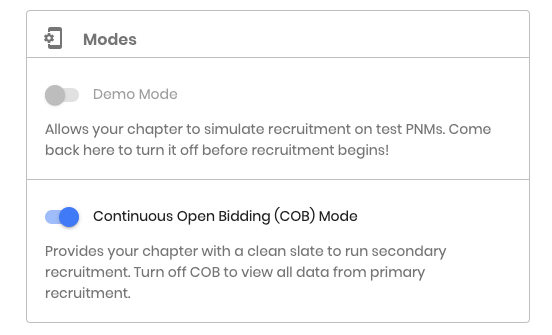

You will now be able to add pnms, set up rounds, and run recruitment according to your organization’s voting criteria in this mode. Results and all reports and their exports will still be available.
COB Mode does not sync with CampusDirector. For questions or support, please contact support@phiredup.com.
Related Articles
MyVote - How to Use COB Mode
The MyVote COB Mode is a feature of MyVote for groups to continue voting on PNMs after primary recruitment. This allows you to upload a new pool of PNMs, vote on PNMs you are considering for membership in the continuous process, and manage your ...MyVote - What is COB Mode?
COB or Continuous Open Bidding Mode, allows MyVote users the ability to continue voting on PNMs after primary “formal” recruitment. If your campus is using CampusDirector, you will be able to upload only those PNMs that you are still considering and ...MyVote - How to add PNMs to COB Mode
To upload PNMs for COB Mode, or from a recruitment management technology that is not CampusDirector, select Import PNMs from the home screen as seen below or by selecting the blue plus sign button in the bottom right corner of your screen and ...MyVote - How to Add PNMs in MyVote
To upload PNMs for COB mode or from ICS, select Import PNMs from the home screen as seen below or by selecting the blue plus sign button in the bottom right corner and selecting Import PNMs. Select 'Choose File' and select the file to upload from ...MyVote - Guide for using MyVote without CampusDirector
Recruitment requires ? PHIRE technology! The number one choice for council recruitment management is CampusDirector - Over 80% of PNMs across the country have joined using CampusDirector! MyVote is set up to sync in real-time with CampusDirector ...